NEWS : The Weblog is BACK again with a new Team !

Choose your Language : English | Arabic | French | Italian | Russian | Spanish | German | Chinese

UPSOS Blog Feedback Survey :

Please complete this short survey to give us feedback on our blog :

http://spreadsheets.google.com/viewform?key=pHtdCqYlJfrHN3D6-lQHsbQ

Saturday, December 6, 2008

Our temporary Logo has been deleted !

As the title show, we decide to delete our temporary Logo :


This Logo make problems with Internet Explorer 6 and make fonts bigger than normal.
We will design a new fresh Logo soon. You can help us, so read this post.

Thank you.

Friday, December 5, 2008

Wikimedia Collect 3,3 Million $ in Donations

Wikipedia entered 2008 as one of the most visited 10 websites in the world.
What could be more relevant as a proof of success ?
Since they’re trying to be a reliable source of information, they’re predicting they will need additional funds, funds they cannot raise without your help.

In the coming year, the Wikimedia Foundation anticipates dramatically increasing spending to keep up with server and traffic capacity demands, add new staff on the organizational level, improve the software and develop methods to better ensure high quality content, all while making progress toward their goal of giving free knowledge to everyone.

Wikimedia collect : 3,3 Million $.

Check this image :

You can Donate Now » , go to Wikipedia and click the donation button.

New Style In Google Accounts

Hello and welcome.

Today, when we log in to our Google Account, we was surprised.
We have find a new style. check this image :

Enjoy the new style and send feedbacks to Google if you can.
Thanks for reading and remember to post comments !

Wednesday, December 3, 2008

Pioneer Unveils 16-Layer of 400GB Optical Disk

Blue-ray will not longer be the optical disc that able to provide the maximum of storage capacities. Pioneer recently has unveiled its 16-layer optical disc that able to store up to 400GB of data in one optical disc. The design of this pioneer disk is based on Blu-ray Disc (BD) with an added breakthrough in material of reflective layers.

The specifications of the pick-up-head (PUH) of the disc is same as the blank BD discs, the material of reflective layers is different where BD with metallic and Pioneer disk with dielectric. Currently, Pioneer discs that can read on BD players is available. Pioneer will release its read only (ROM) 400GB discs from 2008 to 2010, while rewritable 400GB discs will be available in between 2010 to 2012. For more bigger capacity storage like 1TB, it is expected to be available in 2013.

Tuesday, December 2, 2008

Recover Deleted Files with NTFS Undelete

Accidentally deleted a file from your PC ?
Don’t panic! Now there is a free and open source tool that allows you to recover the deleted file within few minutes.
Named as NTFS Undelete, it recovers deleted files directly from hard disk even it is removed permanently from Recycle Bin.
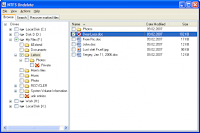
You may wonder how this tool can recover the file since it has been totally deleted from your hard disk.
The concept is when a file is deleted, although the occupied space is marked as free, but contents still remain intact in the disk.
However, the contents may be overwritten by the next file saving, any application launching and closing activities, so to ensure you can retrieve the deleted file safely, it is very important that you don’t do any file saving, launching or closing any application on the same disk immediate after you accidentally deleted the file.
o recover the deleted file on the same disk, you need to download NTFS Undelete ISO image on other PC and burn it to CD, then run NTFS Undelete utility directly from the CD to recover the deleted file.
If you want to recover the deleted file in other partition like in D drive, then you can download NTFS Undelete Windows Installer and get it install in C drive.
Run NFTS Undelete utility from C drive to recover the deleted file in D drive later.
You are strongly encouraged to recover file to different partition from where the deleted file located so that to avoid the recovering file get corrupted and unrecoverable.

NTFS Undelete is simple and easy to use.
You need to select the drive of the deleted file located to scan for the deleted file. It may take some times to do the scanning and a directory named as “Lost Files and Folders” will be created to store the deleted files.
To recover the specific deleted file, go to Search tab and search for the file. There are few options you can use to search for the file like file name, date modified, date created and file size range. Once you have identified the file, just mark it.
Under Recover marked files tab, choose the destination folder where you want the file to be recovered, then click Recover button to start recovering the deleted file.

-

Thanks for reading. you can subscribe to our RSS : click-here.

How to Select and Copy Text from Restricted Website

From My Digital Life blog :

Have you ever experienced some of web pages that don’t allow you to select and copy text? One of the intention is to prevent anybody from stealing the content and distribute it for commercial purpose. In fact this is a little trick that is done by using javascript which prevent you from selecting the text and eventually fail to copy it. Here we would like to show some simple steps that you can turn the situation around by able to copy the text without any restriction.

To overcome this restriction, follow below steps:

1) Go to the website which restricts you from selecting and copying.
2) Copy below Java script and paste it at the address bar and hit enter key.

javascript:void(document.onselectstart=null)


3) Now you can select and copy the text from this website using conventional way - highlight the text followed by Ctrl+C to copy, then paste it into notepad or word document.

Hope this simple trick will able to help you overcome some situation whereby you need to copy the content for personal reference and please use this trick wisely!

Thank you for reading

New languages are available now, we speak your language !


Welcome.

Now our blog is a multi-languages, using Google Translating service : the gadget is available in all the pages :


Also, links are available in the top & the footer :


So enjoy !

Please help us go give a better translation, by suggesting a better one manually.

Thank you.

Monday, December 1, 2008

Today : The Official Launch of UPSOS Blog

Hello World,
today Monday, December 1, 2008 is the date of the official launch of Our blog,

so the this the end of the countdown :


no more of beta mode : this is the final version of Layout, Templates ...

new changes will be available soon.

help us to speared the world by joining our team or linking to our blog.

more informations are in this related posts :

Privacy Policy | Terms of Service | Contact Us | About us | How it work ?

Thanks for reading


Tip of the 48 week :  Shutdown you computer with one click !

Subscribe new posts by RSS feed or by Email

Official UPSOS Blog Feed

↑ Grab this